
 Native to WooCommerce · No data migration
The all-in-one inventory management solution for WordPress and WooCommerce. Track stock, see profits, and make data-driven decisions.
 142 in stockLive across locations
 47.5% margin▲Real profit per order
 7 reorder alertsAuto-drafted POs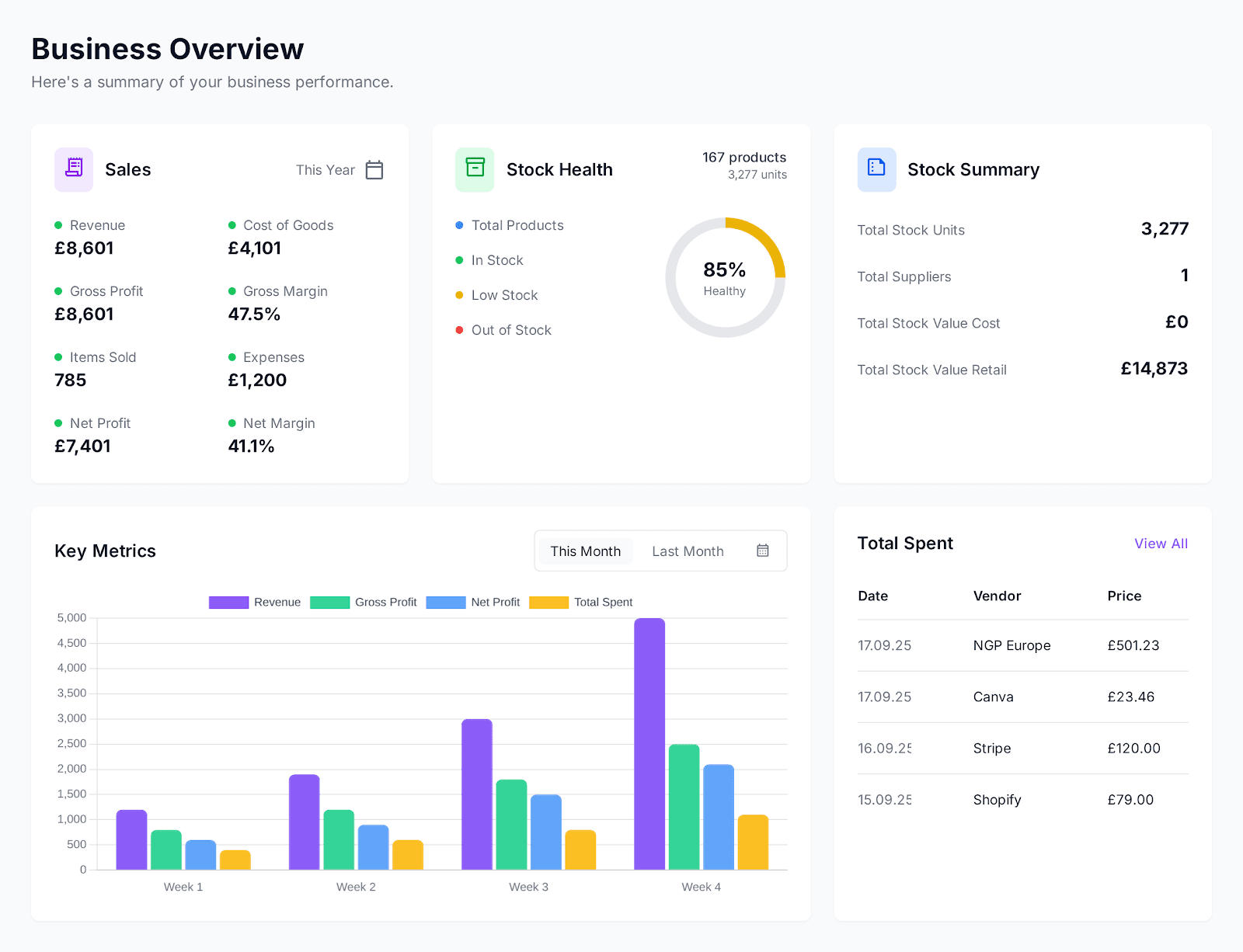
INTEGRATIONS
Connects to the tools you already pay for. No migration, no second source of truth.







HOW IT WORKS
Drop the plugin into your WordPress install. Connects to your existing WooCommerce data automatically — no data migration, no separate SaaS to sync.
CSV import for product costs, or pull from your purchase order history. Set initial cost layers once; the system tracks them from there.
Within 24 hours of your next batch of orders, see real per-line-item gross profit and margin. By month‑end, your full P&L by channel.
PRODUCT TOUR
Revenue, cost of goods, gross profit, margin, stock value, stock health across every SKU. Nothing to set up, nothing to configure — it is what opens when you click in.
Try dashboard free for 30 daysRISK REVERSAL
COMPARISON
| Capabilities | Spreadsheets Free | ATUM £9 / mo | Shelf Planner £19 / mo | Just right Inventory Alpha £42.50 / mo | Cin7 / Katana £200 – £500+ / mo |
|---|---|---|---|---|---|
| Real‑time WooCommerce sync | – | ||||
| True FIFO profit per order | – | – | – | ||
| Variable product bulk editor | – | – | – | ||
| Purchase orders with supplier email | – | – | |||
| Multi‑channel (Website, Amazon, eBay, In‑store) | – | – | – | ||
| Customer analytics & LTV | – | – | – | ||
| Built by a merchant, for merchants | – | – | – | – | |
| Works inside WordPress | – | ||||
| Set up in under 10 minutes | – | – | |||
| No training or onboarding call | – |
TESTIMONIALS
I've run every inventory plugin WooCommerce has on my own shop. They either miss the things that matter or bury them six clicks deep. This is the best one — not because I built it, but because I built it after all the others let me down.
PRICING
Try Inventory Alpha free for 30 days with full access to all features.
I built this because nothing on the market worked for me
I run an ecommerce store on WordPress. For years I managed stock, margins, and restocks in a spreadsheet — updating it every single day because I wanted to see, in real time, how much I was actually making per order, per month, per product.
I looked at the market. Cin7 and Katana are powerful, but £200–£500/month on a business doing £60–70k a year eats nearly a fifth of your net profit. It's not worth it at this size.
So I tested the cheap options — ATUM and Shelf Planner. The UX felt like it was built by people who don't actually use it. Important things were missing. Basic workflows took forever.
So I built the tool I wanted. I use it every day on my own store. Every feature exists because I needed it.
If you're running a WooCommerce store somewhere between spreadsheets and enterprise, this is for you. It's not a side project — it's the system I bet my own shop on.
FAQ
Everything you need to know about Inventory Alpha for your WordPress business.
Inventory Alpha is designed specifically for WordPress and WooCommerce. It integrates directly with your existing products, orders, and variations. No migration needed - your data stays in WooCommerce where it belongs.
GET STARTED
Thirty days. Every feature. No charge.
Not charged for 30 daysCancel anytime5‑minute setup
Overview
If you are looking for WooCommerce inventory management, you will find the same thing sold under half a dozen names. WooCommerce stock management, a WordPress inventory system, an inventory management plugin for WooCommerce, retail inventory software for WordPress. Whichever you typed, you are after one thing: knowing what you hold, what it cost, what it made, and what to reorder before it runs out. Without leaving your WordPress admin.
Inventory Alpha is that system. £50/month, or £42.50/month on annual billing. Every feature included, unlimited products, orders, suppliers, and team members. 30-day free trial, and it reads the WooCommerce sales you already have from the day you install it.
WooCommerce counts stock. You tick “Manage stock”, type a number, and it goes down when something sells. That is stock counting, and it is roughly where WooCommerce stops.
Inventory management is the layer above it. What you hold, what each unit cost you, what margin the order made, what to reorder and from whom, who changed a number and when. Inventory Alpha adds 10 modules for that inside WP admin. Stock, Sales and Orders, Purchase Orders, and Suppliers run the day job. Movement Log, Stock Adjustments, and Roles and Permissions record who changed what. Dashboard, Reports, and Customer Analytics tell you what it all added up to.
It is a WooCommerce inventory management system rather than a stock counter, and the difference shows up the first time somebody asks what a month actually earned.
Start with what WooCommerce gives you. Under Products, enable stock management per product, set a quantity, and decide what happens at zero. That covers a simple catalogue and nothing else.
Then the part that decides whether you reorder in time:
Most WooCommerce stock management plugins stop at quantity. Quantity tells you whether you can ship. It says nothing about whether shipping was worth it.
Inventory Alpha costs every order with FIFO. When the same product has arrived at different prices, the oldest cost layer is consumed first, so the cost attached to an order is what you actually paid for those units rather than a running average. The cost locks in the moment WooCommerce reduces stock, and updates if the order is refunded or its lines change.
That gives you COGS, gross profit, and gross margin on every order. They sit in a filterable Orders list inside Inventory Alpha, and on WooCommerce’s own order screen as three extra columns and three extra totals rows. Seven sales channels ship built in, from Website to Amazon, eBay, and POS, and you can add your own. Tag an order with one and read the profit figures back a channel at a time.
It is the number a WooCommerce profit calculator is estimating. Here it comes from your own purchase costs, in your own database.
Plenty of stores run WooCommerce inventory in Google Sheets, and for a small catalogue it works. Columns for cost, a tab for suppliers, a monthly figure typed in by hand.
It breaks in a predictable way. The sheet and the store become two versions of the truth, and the one that is wrong is always the one you are looking at. Costs get updated on the sheet but not in WooCommerce, or the other way round. Nobody can say which order consumed which delivery, so margin is an estimate. And the work is yours every week, forever.
The sheet is doing four jobs: stock count, cost record, purchase orders, and reporting. Inventory Alpha does all four against the live WooCommerce data, and the CSV exports are still there when you want a sheet.
Search for WooCommerce inventory sync and you will mostly find bridges: a service polling your store, pushing numbers into a separate system somewhere else, and pushing them back. Every one of those is a second copy of your stock and a job that can fail quietly.
Inventory Alpha installs into your WordPress and reads your WooCommerce orders directly, in the same database on the same server. There is no polling, no export, no middle service, and no second copy to reconcile. It is why your existing sales history is there on day one rather than starting from zero.
That also means the data stays yours. Stock movements, cost layers, purchase orders, and supplier records all sit in your database, readable by anything with access to it.
The parts a working retail operation needs, and a stock field does not have:
That is the short version. Every one of these has a page of its own, with the screens, the workflows, and the edge cases this summary skips.